First incident logged in under a minute.
Capture what happened on the floor in under a minute, then run the rest of the investigation over the days that follow. Guided 5 steps, offline photo capture, auto-CAPA on close.
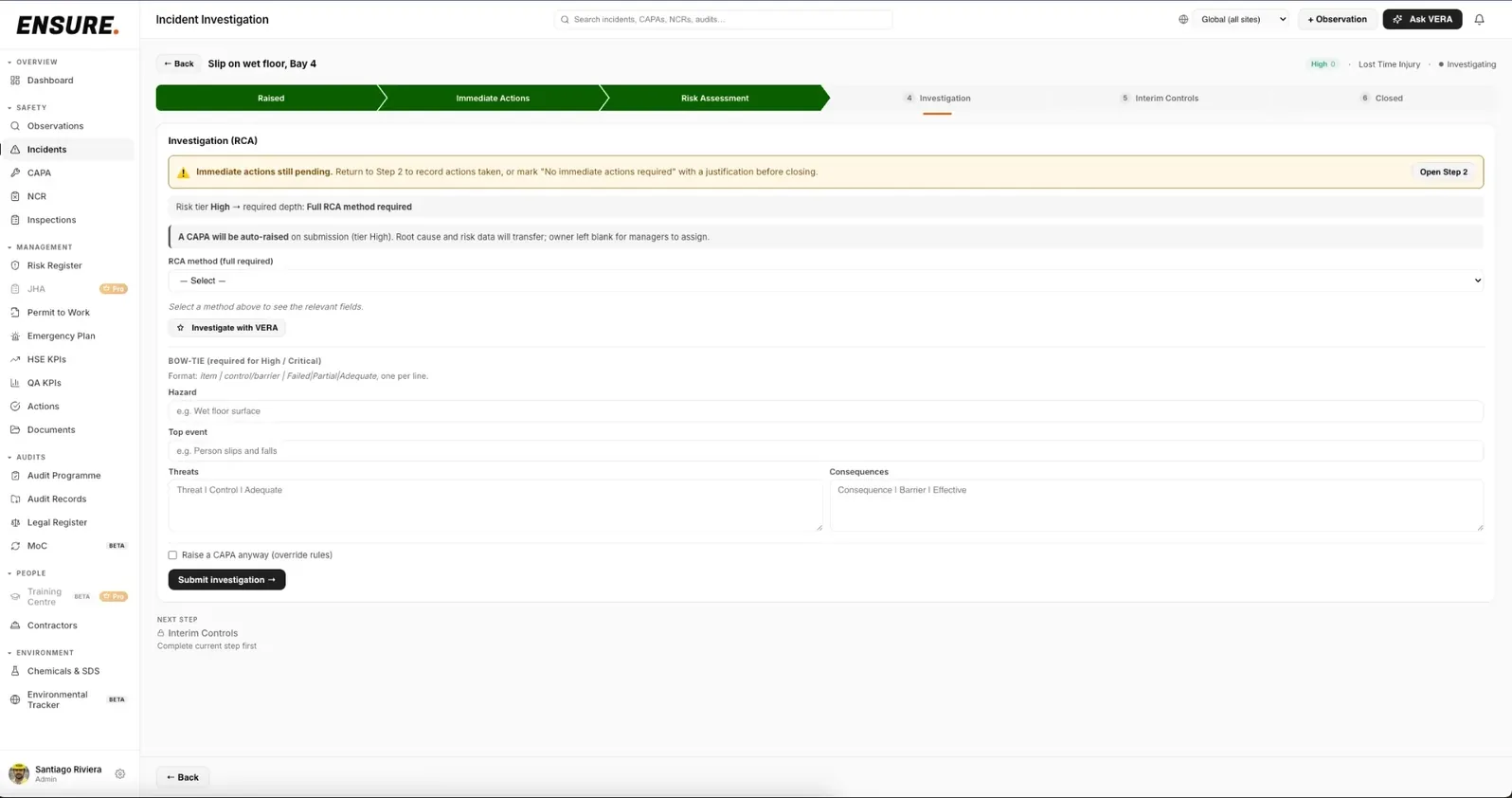
An incident in ENSURE, from first report through investigation to closed.
Incident forms that take 30 minutes to fill out don't get filled out.
The most expensive incident is the one nobody logged. Most platforms make logging an incident a multi-screen, every-field-required ordeal. ENSURE's raise form takes about 40 seconds, the rest of the investigation happens asynchronously through the pipeline.
Raise in under a minute. Investigate over days.
The raise step captures the minimum: what happened, where, severity tier, photos. Everything else, risk assessment, RCA, interim controls, happens in subsequent steps, with the right people pulled in at each.
- Raise with dirty hands, autosaves every field as you go, no "did it save?" anxiety
- The right person gets pulled in at each step: supervisor, investigator, HSE Manager
- Work in parallel, close in sequence, no single bottleneck holds up the whole incident
Offline-capable photo capture
Lose WiFi in a tank farm, a basement, on a rooftop? The camera input keeps working, photos queue in an offline (on-device) outbox and upload when you reconnect. Client-side resize keeps the storage footprint reasonable.
- Included in your plan, usually a feature you'd pay enterprise-tier prices for
- Photos compressed automatically before upload
- Visible offline badge so the field worker knows their photo is queued, not lost
Pick the RCA framework that fits the incident.
When an investigation opens, VERA facilitates a guided 5 Whys or Fishbone, one sharp question at a time, never auto-filling your answer. You stay the investigator; VERA keeps the logic rigorous and the full transcript auditable. Pick from five structured frameworks, with Bowtie required on High and Critical events.
- VERA asks the questions, you decide the answers. It never writes the conclusion for you
- Five RCA methods built in: 5-Whys, Fishbone (Ishikawa), Fault Tree Analysis, FMEA, Direct Observation
- Bowtie required for High and Critical severity, threats, top event, consequences, and the barriers between
- Whichever method you pick, the structured data flows straight into the close-out PDF, auditor-ready
Auto-escalates to CAPA by severity
High actual severity, high potential severity, or repeat detection → ENSURE auto-creates a CAPA on close, linked to the incident with the source_reference preserved. Lower-severity events close without forcing a CAPA.
- Severity matrix you configure once to match your risk framework
- CAPA only triggers when your thresholds say it should, minor events close clean
- Manual escalate button for the judgment calls your matrix can't predict
An incident is rarely a single record.
Investigation finds gaps that need formal change control. Interim controls become permanent. New hazards land in the risk register. ENSURE preserves every link.
What QHSE Managers ask us first.
We already use Excel + SharePoint for incidents. Why change? +
Because the auditor will ask for the trail between the incident, the CAPA, the SOP that was updated, and the training records that prove people read it, and Excel can't show that link. ENSURE preserves every cross-record connection so the trail builds itself, every time.
How long until we're audit-ready? +
Configuring sites, departments, users and roles is designed to take under an hour. Importing an existing risk register from Excel takes another 30 minutes. From there, every incident logged becomes part of the audit trail automatically. It's built to go live in a day and get you ready for audit week.
What about field workers who don't have smartphones? +
Anyone can raise an incident on their behalf, supervisor on a tablet, HSE Manager on a desktop, plant manager on a shared kiosk. The raise step takes under a minute whether it's the worker reporting directly or someone reporting for them. Photos can be added later from any device.
Does this work across multiple sites and countries? +
Yes. Every record is scoped by country / site / department. A country-scoped HSE Manager only sees their country's incidents. The corporate HSE Director sees everything. Roll-ups, KPIs and exports work at any scope level, site, country, or organization-wide.
What happens to our data if we leave? +
Every module exports to Excel and PDF with one click, any time, including the full audit trail. No vendor lock-in, no "contact us to export" friction. If you ever decide to leave, you walk away with everything you put in.
Is our incident data secure and GDPR-compliant? +
Row-level isolation per organization at the database layer, your data is never queryable by another customer. Encrypted at rest, EU data residency, GDPR-native data subject request flows built in. Audit logs on every change. Built in Switzerland on Supabase.
Built for safety-critical industries. Manufacturing · Construction · Logistics · Oil & Gas · Food & Beverage · Healthcare · Facilities
Stop losing incidents to forms nobody completes.
Under a minute to raise. Full investigation over the days that follow. Book a 30-minute demo and we'll run YOUR last incident through ENSURE so you see exactly what changes.